The Outer Worlds 2 on PC: Which Graphics Card Should You Choose for the Best Experience?
The Outer Worlds 2 is not just another sci-fi RPG. It is a dense, colorful, choice-driven space adventure where environments, lighting, textures, effects, and large open areas can quickly put pressure on your PC. If you want to explore new planets smoothly, enjoy sharp visuals, and avoid performance drops during combat or exploration, choosing the right graphics card is essential.
The official PC requirements list an AMD RX 5700, NVIDIA GTX 1070, or Intel Arc A580 as the minimum GPU, while the recommended configuration moves up sharply to an AMD Radeon RX 6800 XT or NVIDIA RTX 3080, with 16GB of RAM and 110GB of SSD storage required. That gap tells us something important: The Outer Worlds 2 may run on older hardware, but enjoying it properly requires a much stronger GPU.
Why The Outer Worlds 2 Needs a Serious GPU
The Outer Worlds 2 is built around detailed sci-fi worlds, outdoor exploration, futuristic settlements, combat encounters, and strong visual identity. This type of RPG usually benefits from a graphics card that can handle high-resolution textures, large environments, lighting effects, and stable frame rates over long play sessions.
The official recommended GPU level — RTX 3080 or RX 6800 XT — is already quite demanding compared with many mainstream PC games. That means entry-level cards should be treated as a compromise, especially if you want to play above 1080p or with higher settings.
For a comfortable experience, you should focus on three elements: enough VRAM, strong raster performance, and support for modern upscaling technologies. A card with 16GB of VRAM is a safer choice for players who want to keep high textures enabled and avoid upgrading again too quickly.
Practical tip: if your current GPU is close to the minimum requirement, target 1080p with medium settings first. If you want 1440p or high settings, aim for a newer 16GB graphics card instead.
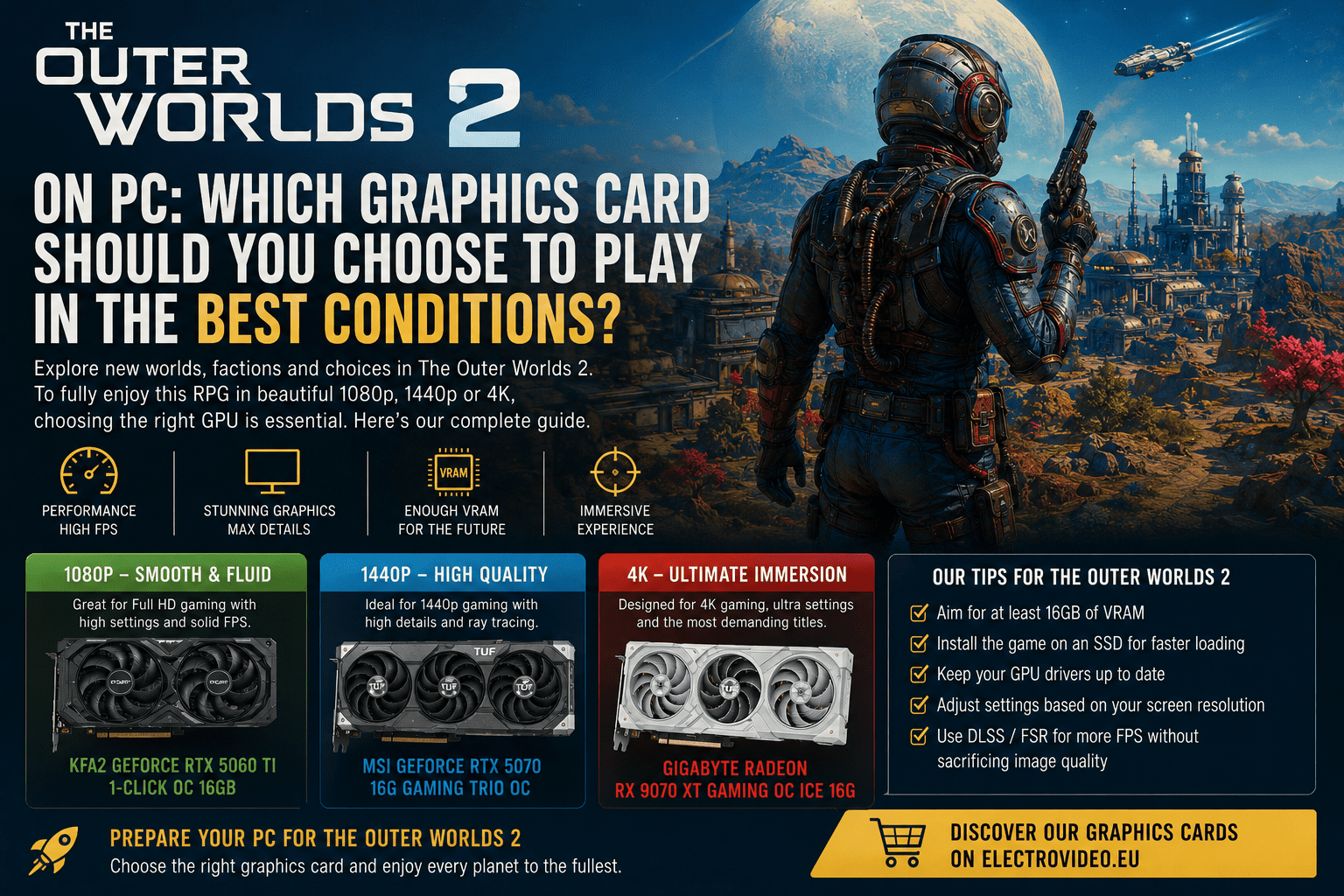
Best Value for 1080p and 1440p: RTX 5060 Ti 16GB
For players who want a modern GPU without jumping directly into very high-end pricing, the RTX 5060 Ti 16GB is a sensible starting point. It gives you enough memory for recent games and provides access to NVIDIA’s latest technologies, including DLSS support depending on the model.
A relevant option available on ElectroVideo is the ASUS TUF Gaming GeForce RTX 5060 Ti OC Edition 16GB. ElectroVideo lists it with 16GB of memory, NVIDIA Blackwell architecture, DLSS 4, hardware ray tracing, and advanced AI capabilities.
This type of card is best suited for players targeting 1080p with high settings or 1440p with optimized settings. It is not the most extreme option, but it makes sense if you want a balanced GPU for The Outer Worlds 2 and other recent AAA games.
Practical tip: in 1440p, do not immediately push every setting to Ultra. Start with High settings, enable upscaling if available, then adjust shadows, reflections, and post-processing depending on your frame rate.
For Premium 1440p: RTX 5070 Ti Is the Safer Choice
If you want a more comfortable 1440p experience, the RTX 5070 Ti is a stronger choice. The Outer Worlds 2’s recommended GPU level is already close to an older high-end card, so going for a newer upper-mid/high-end model gives you more headroom for demanding areas and future patches.
The MSI GeForce RTX 5070 Ti 16G GAMING TRIO OC is especially relevant here. ElectroVideo lists it with 16GB of GDDR7 memory, a 256-bit memory interface, triple-fan Stormforce cooling, Dual BIOS, and a reinforced metal backplate.
This card is a better match if you play on a 1440p high-refresh monitor, want high settings, or plan to keep your GPU for several years. It also gives you more flexibility if the game receives heavier visual updates or if you play other demanding titles.
Practical tip: for 1440p high refresh, prioritize stable frame pacing over maximum visual settings. A consistent 90–120 FPS often feels better than unstable Ultra settings.
For 4K and Maximum Visual Comfort: RX 9070 XT 16GB
For 4K gaming, you need a more muscular GPU. The jump from 1440p to 4K is significant, and The Outer Worlds 2 already asks for a powerful recommended configuration. A modern 16GB high-end graphics card is therefore the more realistic choice.
The Gigabyte AORUS Radeon RX 9070 XT ELITE 16G is a strong AMD option for players who want high-resolution performance. ElectroVideo describes it as based on AMD RDNA 4, with third-generation hardware ray tracing, second-generation AI, AMD Radeon Anti-Lag 2, factory overclocking, Dual BIOS, and WINDFORCE triple-fan cooling.
This kind of GPU is best suited for players using a 4K monitor or a demanding 1440p ultrawide display. It also makes sense if you want a card that will remain relevant for future RPGs and open-world games.
Practical tip: for 4K, use upscaling when available. It can preserve image quality while giving you a much smoother experience than native rendering.
Final Recommendation
For The Outer Worlds 2, the smartest choice depends on your screen. For 1080p and optimized 1440p, the ASUS TUF RTX 5060 Ti 16GB is a solid modern entry point. For premium 1440p, the MSI RTX 5070 Ti 16G GAMING TRIO OC offers much more comfort. For 4K or long-term high-end gaming, the Gigabyte AORUS Radeon RX 9070 XT ELITE 16G is the most ambitious option among these recommendations.
Preparing your PC for The Outer Worlds 2? Browse ElectroVideo’s graphics card selection and choose the GPU that matches your resolution, your budget, and the level of visual quality you want from your next sci-fi RPG adventure.