Pragmata is the kind of game that immediately makes you question whether your PC is truly ready for next-generation visuals. A sci-fi universe, lunar environments, cold artificial lighting, metallic surfaces, futuristic suits, particle effects, cinematic scenes, and heavy atmosphere: everything about the game seems designed to benefit from ray tracing.
But ray tracing is demanding. It can make reflections, shadows, and lighting look far more realistic, but it can also reduce performance sharply if your graphics card is not powerful enough. Capcom’s recommended ray tracing requirements point toward at least an RTX 3060 12GB or an RX 6700 XT 12GB, with an SSD also recommended. In other words, if you want a smooth and enjoyable experience, it is better to aim above the strict minimum.
1. The Real Minimum for Ray Tracing: Do Not Go Below 12GB of VRAM
For Pragmata, there is a major difference between simply running the game and actually enjoying it with ray tracing enabled. An older graphics card may be enough for basic gameplay without advanced visual effects, but ray tracing requires much stronger GPU performance.
The important point here is video memory. In 2026, choosing an 8GB graphics card for a modern AAA game is becoming increasingly risky, especially if you want high textures, ray tracing, or a resolution above 1080p. For Pragmata, 12GB of VRAM should be considered the practical minimum for ray tracing, while 16GB gives you a much safer margin.
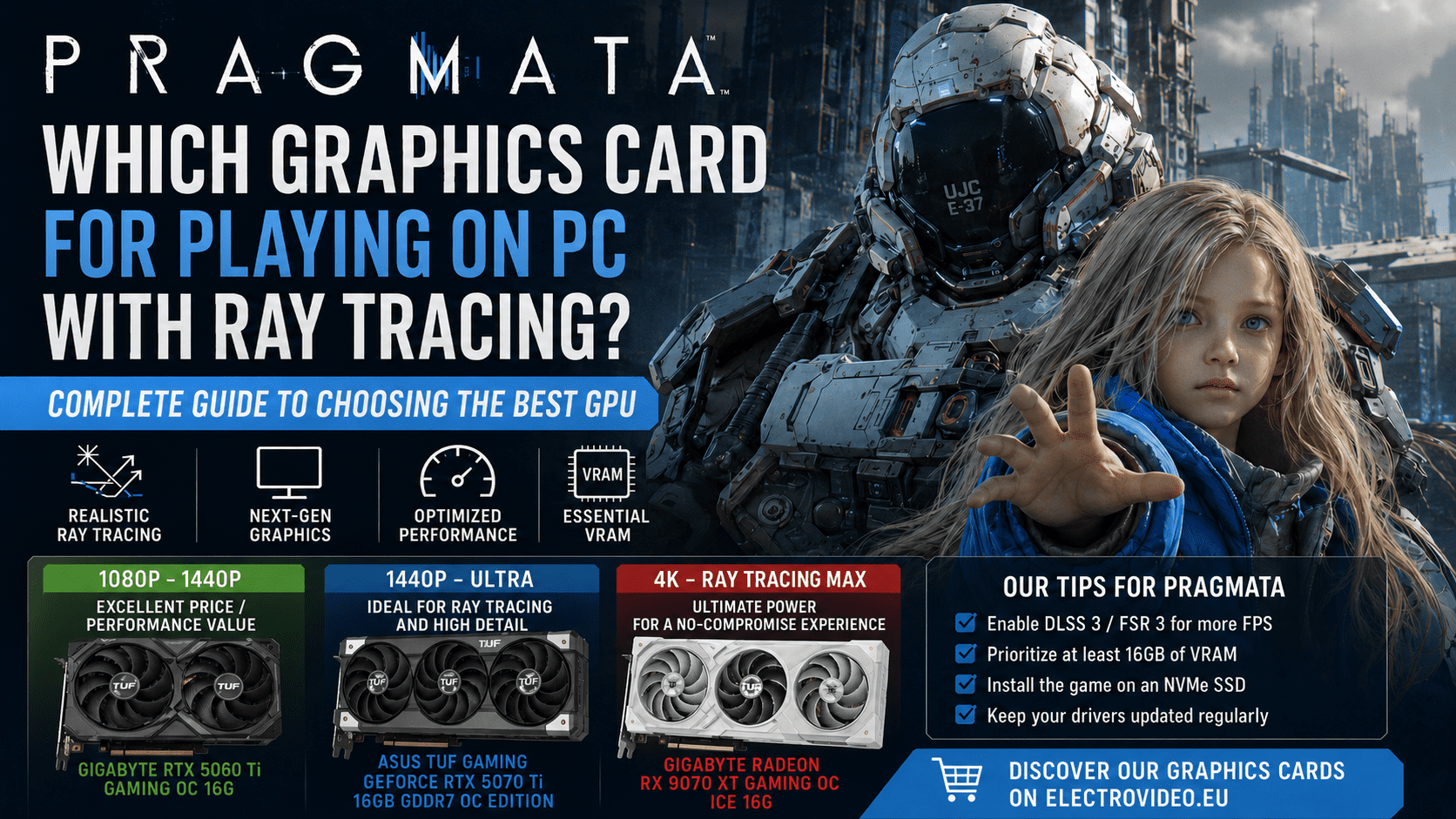
That is why a card like the Gigabyte GeForce RTX 5060 Ti GAMING OC 16G makes sense for 1080p or 1440p gaming with strong visual quality. With 16GB of GDDR7 memory, factory overclocking, a triple-fan WINDFORCE cooling system, and support for modern NVIDIA technologies, it offers a more comfortable base than older 8GB or 12GB cards.
Actionable tip: if your goal is 1080p ray tracing, start with a High graphics preset, enable DLSS if available, then adjust ray-traced reflections and shadows before lowering texture quality.
2. For 1440p Gaming: Choose a Recent 16GB Graphics Card
1440p is probably the best sweet spot for Pragmata. It delivers a much sharper image than 1080p without being as demanding as 4K. However, once ray tracing is enabled, you still need a modern, well-cooled graphics card with enough video memory.
In this category, an RTX 5060 Ti 16GB can be a solid choice if you are ready to use upscaling and fine-tune graphics settings. NVIDIA RTX 50 series cards also benefit from recent DLSS technologies on compatible models, which can help improve frame rates while preserving image quality.
For players who want a more stable and ambitious 1440p experience, stepping up to a higher-end GPU is more appropriate. The MSI GeForce RTX 5070 Ti 16G GAMING TRIO OC is better suited for demanding modern games, heavy graphics settings, and ray tracing workloads. Its 16GB of memory gives it a more comfortable profile for high-resolution textures and future AAA releases.
Actionable tip: at 1440p, prioritize consistency. A stable 60 FPS with well-balanced ray tracing is better than an “Ultra” preset that causes visible drops during combat, cutscenes, or dense environments.
3. For 4K and Advanced Ray Tracing: Move to High-End GPUs
If your goal is to play Pragmata in 4K with ray tracing enabled, you need to be realistic: a mid-range GPU will not deliver a comfortable experience without compromises. 4K already puts a heavy load on the graphics card, and ray tracing adds another demanding rendering layer.
For this type of setup, a card like the Gigabyte Radeon RX 9070 XT GAMING OC ICE 16G becomes much more relevant. With 16GB of GDDR6 memory and AMD’s recent RDNA architecture, it is designed for high-resolution gaming and more demanding visual settings.
Another interesting AMD option is the PowerColor Reaper AMD Radeon RX 9070 XT 16GB. This type of card is better suited to players who want to push graphics quality, use a large 4K display, or build a more future-proof PC for upcoming AAA games.
These GPUs are especially relevant if you want to enjoy Pragmata’s sci-fi atmosphere with more realistic lighting, sharper reflections, and stronger visual immersion.
Actionable tip: in 4K, always use upscaling. Whether you choose NVIDIA or AMD, technologies such as DLSS or FSR can make the difference between a visually impressive but unstable experience and a genuinely playable one.
4. What to Check Before Upgrading Your GPU
Before buying a new graphics card, check the rest of your configuration. Pragmata recommends an SSD, which means an old mechanical hard drive may lead to longer loading times or a less responsive experience. RAM also matters: 16GB may be enough for a classic gaming setup, but 32GB is more comfortable for recent games, especially if you keep a browser, Discord, recording software, or other apps open in the background.
Driver updates are also important. NVIDIA and AMD frequently release optimizations around major game launches, and these updates can improve stability, reduce bugs, and sometimes increase performance.
Finally, match your GPU to your monitor. A Radeon RX 9070 XT is not necessarily useful for a basic 1080p 60Hz screen, but it makes much more sense with a 1440p high-refresh monitor or a 4K display. On the other hand, a card that is too limited will quickly show its weaknesses if you enable ray tracing on a high-resolution screen.
Final Recommendation
To play Pragmata on PC with ray tracing, avoid graphics cards with limited VRAM. The strict minimum sits around an RTX 3060 12GB or RX 6700 XT 12GB, but the smarter choice today is to aim for a 16GB graphics card.
For 1080p or controlled 1440p ray tracing, the Gigabyte GeForce RTX 5060 Ti GAMING OC 16G is a relevant option. For a more ambitious 1440p experience, an RTX 5070 Ti is more comfortable. For 4K and advanced ray tracing, Radeon RX 9070 XT models are much better suited.
Preparing your PC for Pragmata? Explore the graphics cards available on ElectroVideo and choose the GPU that matches your screen, your budget, and the level of ray tracing you actually want to enjoy.